- 简介(Introduction)
- 概念概述(Conceptual Overview)
- 引导程序(Bootstrap)
- Html编译(HTML Compiler)
- 数据绑定(Data Binding)
- 控制器(Controllers)
- 服务(Services)
- 作用域(Scope)
- 依赖注入(Dependency Injection)
- 模板(Templates)
- 使用css(Working With CSS)
- 过滤器(Filters)
- 表单(Forms)
- 指令(Directives)
- Components
- Component Router
- 动画(Animations)
- 模块(Modules)
- 表达式(Expressions)
- 供应者(Providers)
- $location
- 单元测试
- 端对端测试
AngularJS $location
$location服务负责解析浏览器地址栏中的URL(基于window.location),以便你的应用可以访问它。
这是一个双向同步机制 —— 对地址栏URL的任何修改都会被映射到$location服务中,对$location的任何修改也同样会被映射到地址栏。
$location服务:
- 导出在浏览器地址栏中的当前地址,以便你
- 监视与观察此地址的变更
- 修改URL
- 当用户做下列操作时,维持
$location和浏览器当前URL之间的同步- 在浏览器地址栏中修改地址
- 在浏览器中点击前进、后退按钮,或点击“历史”中的链接
- 在页面上点击一个链接
- 把URL对象表示成一组方法(protocol, host, port, path, search, hash)
$location和window.location的对比
| window.location | $location服务 | |
|---|---|---|
| 用途 | 允许你访问浏览器的当前地址 | 相同 |
| API | 导出带有属性的“原始”对象,它可以被直接修改 | 导出jQuery风格的setter和getter方法 |
| 和Angular应用的生命周期整合在一起 | 无 | 了解所有Angular生命周期中的各个阶段,与$watch集成 ... |
| 与HTML5 API无缝整合 | 否 | 是(对老浏览器,具有退回机制,译注:新式使用Push State API,老式使用#hashbang方式) |
| 带有应用宿主页面的上下文(context)路径 | 否 - window.location.path将返回"/docroot/actual/path" | 是 - $location.path()返回"/actual/path" |
我该什么时候使用$location?
只要你的应用想更改当前地址,或者你想要修改浏览器的当前地址,就用它吧!
什么时候不该用它?
在浏览器地址变化的时候,它不会导致全页面刷新。要想在地址变化之后重载整个页面,请使用底层API$window.location.href。
API的通用概览
$location服务可能具有不同的行为,这取决于它被实例化时候你提供给它的配置。默认的配置适用于很多应用,而自定义的配置可以让你启用一些新特性。
一旦$location服务被实例化了,你能通过jQuery风格的getter或setter方法与它互动,这样你就能获取或修改浏览器中的当前URL了。
$location服务配置
要想配置$location服务,应该获取$locationProvider对象,然后按下面的方法设置它的参数:
html5Mode(模式): {boolean}
true- 参见下文中的“HTML5模式”
false- 参见下文中的“Hashbang模式”
默认值:falsehashPrefix(前缀): {string}
Hashbang的URL前缀(用于Hashbang模式或者使用Html5模式但运行在老式浏览器中)
默认值:""(空字符串)
范例配置
$locationProvider.html5Mode(true).hashPrefix('!');
Getter和setter方法
对于地址中的只读部分(absUrl, protocol, host,
    port),$location
服务提供getter方法,对于可变部分(url, path, search, hash),则同时提供getter和setter方法。
// 或的当前path
$location.path();

// 修改当前path
$location.path('/newValue')
所有的setter方法都返回同一个$location对象,以便你进行链式调用。例如,要想一次性修改地址中的几个字段,可以用这样的语法把几个setter串起来:
$location.path('/newValue').search({key: value});
replace方法
有一个特殊的replace方法,用来告诉$location服务:你下次和浏览器同步的时候,应该用新地址“替代”最后一条历史记录而不是“追加”新纪录。这在你实现重定向的时候很有用,否则它将“玩死”浏览器的“后退”按钮(“后退”立刻触发一次重定向,我胡汉三又回来了!)。要想改变当前地址却不创建新历史记录,你可以这样调用:
  $location.path('/someNewPath');
  $location.replace();
  // 你也可以像这样把它们串起来:$location.path('/someNewPath').replace();
注意,setter方法不会立刻更新window.location。反之,$location服务是挂在与作用域(scope)的生命周期中的,它会在作用域的$digest阶段把多个$location调用合并到一起,然后“提交”到window.location对象中。由于对$location的状态的多次修改会被合并成一次修改通知浏览器,在一个生命周期内你只要调用了一次replace操作就可以“提交”一个replace操作(“替换”而不是“追加”历史记录)。浏览器地址一旦被更新,$location服务器就会重置replace()方法设置的标识,将来的修改将会追加新的历史记录,除非再次调用replace()`。
setter和字符编码
你可以给$location服务传入特殊字符,它将根据RFC 3986中指定的规则进行编码。
这会在执行下列方法时自动触发:
- 所有通过
$location的setter方法(path(),search(),hash())传入的值都将被编码。 - getter方法(不带任何参数调用
path(),search(),hash()方法)返回的值将被解码。 - 调用
absUrl()方法的返回值是一个编码过的字符串。 - 调用
url()方法返回的值是path,search和hash,形如/path?search=a&b=c#hash,各个组成部分也都是编码过的。
Hashbang和HTML5模式
$location服务有两种配置模式,它将控制浏览器地址栏中的地址显示格式:Hashbang模式(默认)和HTML5模式,
后者基于HTML5的历史(history)API。无论哪种模式,应用层都使用相同的API,
$location服务会自己找出合适的URL格式和浏览器API,来完成修改浏览器地址和进行历史管理的工作。
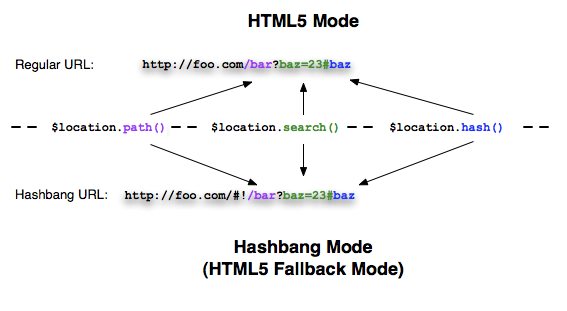
| Hashbang模式 | HTML5模式 | |
|---|---|---|
| 配置项 | 默认 | { html5Mode: true } |
| URL格式 | 在所有浏览器中使用hashbang格式 | 现代浏览器中使用标准URL格式,老式浏览器中使用hashbang格式 |
| <a href=""> link重写 | 否 | 是 |
| 需要服务端配置 | 否 | 是 |
Hashbang模式(缺省模式)
在这种模式中,$location在所有浏览器中都使用Hashbang地址
范例
it('显示范例', inject(
  function($locationProvider) {
    $locationProvider.html5Mode(false);
    $locationProvider.hashPrefix('!');
  },
  function($location) {
    // 打开http://example.com/base/index.html#!/a
    $location.absUrl() == 'http://example.com/base/index.html#!/a'
    $location.path() == '/a'

    $location.path('/foo')
    $location.absUrl() == 'http://example.com/base/index.html#!/foo'

    $location.search() == {}
    $location.search({a: 'b', c: true});
    $location.absUrl() == 'http://example.com/base/index.html#!/foo?a=b&c'

    $location.path('/new').search('x=y');
    $location.absUrl() == 'http://example.com/base/index.html#!/new?x=y'
  }
));
把应用献给爬虫
要想让你的Ajax应用能够被搜索引擎找到,你必须在HTML文档的head部分添加一个特殊的meta标记:
<meta name="fragment" content="!" />
这将导致爬虫机器人使用_escaped_fragment_参数请求你的链接,以便你的服务器能识别出爬虫,并且给他一个HTML快照。
更多信息,参见让Ajax应用也能被抓取。
HTML5模式
在HTML5模式中,$location服务的getter和setter方法通过HTML5 history API与浏览器地址栏互动,
它允许你使用标准的URL path和search格式来代替等价的hashbang模式。如果浏览器不支持HTML5 history API,
那么$location服务将自动退回到使用hashbang URL。这将把你从担心用户的浏览器是否支持history API中解放出来,
$location服务将会透明的帮你选择最佳的可用形式。
- 在一个老式浏览器中使用标准url格式 -> 重定向到hashbang URL
- 在一个现代浏览器中使用hashbang格式 -> 用标准URL形式进行重写
范例
it('显示范例', inject(
  function($locationProvider) {
    $locationProvider.html5Mode(true);
    $locationProvider.hashPrefix('!');
  },
  function($location) {
    // 在支持HTML5历史API的浏览器中:
    // 打开 http://example.com/#!/a -> 将被重写为 http://example.com/a
    // (替换 http://example.com/#!/a 的历史记录)
    $location.path() == '/a'

    $location.path('/foo');
    $location.absUrl() == 'http://example.com/foo'

    $location.search() == {}
    $location.search({a: 'b', c: true});
    $location.absUrl() == 'http://example.com/foo?a=b&c'

    $location.path('/new').search('x=y');
    $location.url() == 'new?x=y'
    $location.absUrl() == 'http://example.com/new?x=y'

    // 在不支持HTML5历史API的浏览器中:
    // 打开 http://example.com/new?x=y -> 将被重定向到 http://example.com/#!/new?x=y
    // (替换 http://example.com/new?x=y 的历史记录)
    $location.path() == '/new'
    $location.search() == {x: 'y'}

    $location.path('/foo/bar');
    $location.path() == '/foo/bar'
    $location.url() == '/foo/bar?x=y'
    $location.absUrl() == 'http://example.com/#!/foo/bar?x=y'
  }
));
退回到老式浏览器
对于支持HTML5 history API的浏览器,$location使用HTML5 history API来修改path和search部分。
如果浏览器不支持history API,$location提供hashbang URL。这会把你从不得不担心用户的浏览器是否支持history API中解放出来,
$location服务为你透明的完成这一切。
HTML链接重写
如果你正在使用HTML5 history API模式,你需要在不同的浏览器中使用不同的链接,但是你要做的只是制定一个标准URL链接形式,
比如:<a href="/some?foo=bar">某链接</a>
当用户点击这个链接时,
- 在老式浏览器中,地址变为
/index.html#!/some?foo=bar - 在现代浏览器中,地址变为
/some?foo=bar
在下面的例子中,链接不会被重写,而是会在当前页面中执行一次全页面刷新。
- 链接包含
target属性
例如:<a href="/ext/link?a=b" target="_self">某链接</a> - 指向其他域名的绝对链接
例如:<a href="http://angularjs.org/">某链接</a> - 当通过base元素定义了页面基地址时,以'/'开头,但是指向其他基地址的链接
例如:<a href="/not-my-base/link">某链接</a>
当在域名的根路径下运行Angular时,可能还有其他普通应用在同一个目录下,"otherwise"路由将会尝试处理所有URL, 甚至包括映射到静态文件的那些。
要想阻止这种行为,你可以把你的base元素的href属性到<base href=".">,然后,给所有应该由你处理的链接加上.前缀。
这样,那些没有用.做前缀的地址将不会再被Angular路由,也就不会再被你的$routeProvider中配置的otherwise规则拦截到了。
服务端
使用HTML5模式需要在服务端重写URL,通常,你要把所有链接都转给应用的入口点(比如index.html)。
让爬虫抓取你的应用
如果你想你的AJAX应用被web爬虫索引到,你需要添加下列meta标签到你文档中的HEAD区:
<meta name="fragment" content="!" />
这个语句会导致爬虫在请求链接时带上一个空的_escaped_fragment_参数,以便你的服务器可以识别出爬虫,
并且给它提供一个HTML快照。更多信息,参见让AJAX应用可以被抓取
相对链接
注意检查所有相对链接、图片、脚本等。你或者要在主页面的head区通过<base href="/my-base">指定一个url基地址,或者到处使用绝对路径(用/开头的)。
因为相对路径将根据当前页面的初始绝对地址解析为绝对路径,而这通常与此应用的根路径是不同的。
强烈建议在根路径下运行使用HTML5历史API模式的Angular应用,它会处理好所有关于相对路径的问题。
在不同的浏览器中使用链接
因为HTML5模式下的路径重写能力,你的用户也可以在老式浏览器中打开标准url链接,或者在现代浏览器中打开hashbang链接:
- 现代浏览器将会使用标准URL形式重写hashbang地址。
- 老式浏览器将会把标准URL重定向到hashbang URL。
范例
接下来你将看到两个$location实例。全都使用HTML5模式但运行于不同的浏览器,你将看到它们的区别。
这两个$location服务连接到虚拟浏览器中,每个input输入框表示一个浏览器的地址栏。
注意,你在第一个浏览器中输入hashbang url的时候(标准URL也一样),它不会重写/重定向到标准或hashbang形式, 因为这种转换只会发生在页面加载时解析初始URL的那一步。
在这个例子中,我们使用<base href="/base/index.html" />
浏览器在HTML5模式
<div ng-controller="LocationController">
  <div ng-address-bar></div><br><br>
  <div>
    $location.protocol() = <span ng-bind="$location.protocol()"></span> <br>
    $location.host() = <span ng-bind="$location.host()"></span> <br>
    $location.port() = <span ng-bind="$location.port()"></span> <br>
    $location.path() = <span ng-bind="$location.path()"></span> <br>
    $location.search() = <span ng-bind="$location.search()"></span> <br>
    $location.hash() = <span ng-bind="$location.hash()"></span> <br>
  </div>
  <div id="navigation">
    <a href="http://www.example.com/base/first?a=b">/base/first?a=b</a> |
    <a href="http://www.example.com/base/sec/ond?flag#hash">sec/ond?flag#hash</a> |
    <a href="/other-base/another?search">external</a>
  </div>
</div>
angular.module('html5-mode', ['fake-browser', 'address-bar'])

// Configure the fakeBrowser. Do not set these values in actual projects.
.constant('initUrl', 'http://www.example.com/base/path?a=b#h')
.constant('baseHref', '/base/index.html')
.value('$sniffer', { history: true })

.controller('LocationController', function($scope, $location) {
  $scope.$location = {};
  angular.forEach('protocol host port path search hash'.split(' '), function(method) {
   $scope.$location[method] = function() {
     var result = $location[method]();
     return angular.isObject(result) ? angular.toJson(result) : result;
   };
  });
})

.config(function($locationProvider) {
  $locationProvider.html5Mode(true).hashPrefix('!');
})

.run(function($rootElement) {
  $rootElement.on('click', function(e) { e.stopPropagation(); });
});
angular.module('fake-browser', [])

.config(function($provide) {
 $provide.decorator('$browser', function($delegate, baseHref, initUrl) {

  $delegate.onUrlChange = function(fn) {
     this.urlChange = fn;
   };

  $delegate.url = function() {
     return initUrl;
  };

  $delegate.defer = function(fn, delay) {
     setTimeout(function() { fn(); }, delay || 0);
   };

  $delegate.baseHref = function() {
     return baseHref;
   };

   return $delegate;
 });
});
angular.module('address-bar', [])
.directive('ngAddressBar', function($browser, $timeout) {
   return {
     template: 'Address: <input id="addressBar" type="text" style="width: 400px" >',
     link: function(scope, element, attrs) {
       var input = element.children('input'), delay;

       input.on('keypress keyup keydown', function(event) {
               delay = (!delay ? $timeout(fireUrlChange, 250) : null);
               event.stopPropagation();
             })
            .val($browser.url());

       $browser.url = function(url) {
         return url ? input.val(url) : input.val();
       };

       function fireUrlChange() {
         delay = null;
         $browser.urlChange(input.val());
       }
     }
   };
 });
var addressBar = element(by.css("#addressBar")),
    url = 'http://www.example.com/base/path?a=b#h';


it("should show fake browser info on load", function() {
  expect(addressBar.getAttribute('value')).toBe(url);

  expect(element(by.binding('$location.protocol()')).getText()).toBe('http');
  expect(element(by.binding('$location.host()')).getText()).toBe('www.example.com');
  expect(element(by.binding('$location.port()')).getText()).toBe('80');
  expect(element(by.binding('$location.path()')).getText()).toBe('/path');
  expect(element(by.binding('$location.search()')).getText()).toBe('{"a":"b"}');
  expect(element(by.binding('$location.hash()')).getText()).toBe('h');

});

it("should change $location accordingly", function() {
  var navigation = element.all(by.css("#navigation a"));

  navigation.get(0).click();

  expect(addressBar.getAttribute('value')).toBe("http://www.example.com/base/first?a=b");

  expect(element(by.binding('$location.protocol()')).getText()).toBe('http');
  expect(element(by.binding('$location.host()')).getText()).toBe('www.example.com');
  expect(element(by.binding('$location.port()')).getText()).toBe('80');
  expect(element(by.binding('$location.path()')).getText()).toBe('/first');
  expect(element(by.binding('$location.search()')).getText()).toBe('{"a":"b"}');
  expect(element(by.binding('$location.hash()')).getText()).toBe('');


  navigation.get(1).click();

  expect(addressBar.getAttribute('value')).toBe("http://www.example.com/base/sec/ond?flag#hash");

  expect(element(by.binding('$location.protocol()')).getText()).toBe('http');
  expect(element(by.binding('$location.host()')).getText()).toBe('www.example.com');
  expect(element(by.binding('$location.port()')).getText()).toBe('80');
  expect(element(by.binding('$location.path()')).getText()).toBe('/sec/ond');
  expect(element(by.binding('$location.search()')).getText()).toBe('{"flag":true}');
  expect(element(by.binding('$location.hash()')).getText()).toBe('hash');
});
在HTML5浏览器的回退模式(Hashbang模式)
<div ng-controller="LocationController">
  <div ng-address-bar></div><br><br>
  <div>
    $location.protocol() = <span ng-bind="$location.protocol()"></span> <br>
    $location.host() = <span ng-bind="$location.host()"></span> <br>
    $location.port() = <span ng-bind="$location.port()"></span> <br>
    $location.path() = <span ng-bind="$location.path()"></span> <br>
    $location.search() = <span ng-bind="$location.search()"></span> <br>
    $location.hash() = <span ng-bind="$location.hash()"></span> <br>
  </div>
  <div id="navigation">
    <a href="http://www.example.com/base/first?a=b">/base/first?a=b</a> |
    <a href="http://www.example.com/base/sec/ond?flag#hash">sec/ond?flag#hash</a> |
    <a href="/other-base/another?search">external</a>
  </div>
</div>
angular.module('hashbang-mode', ['fake-browser', 'address-bar'])

// Configure the fakeBrowser. Do not set these values in actual projects.
.constant('initUrl', 'http://www.example.com/base/index.html#!/path?a=b#h')
.constant('baseHref', '/base/index.html')
.value('$sniffer', { history: false })

.config(function($locationProvider) {
  $locationProvider.html5Mode(true).hashPrefix('!');
})

.controller('LocationController', function($scope, $location) {
  $scope.$location = {};
  angular.forEach('protocol host port path search hash'.split(' '), function(method) {
    $scope.$location[method] = function() {
      var result = $location[method]();
      return angular.isObject(result) ? angular.toJson(result) : result;
    };
  });
})

.run(function($rootElement) {
  $rootElement.on('click', function(e) {
    e.stopPropagation();
  });
});
angular.module('fake-browser', [])

.config(function($provide) {
 $provide.decorator('$browser', function($delegate, baseHref, initUrl) {

  $delegate.onUrlChange = function(fn) {
     this.urlChange = fn;
   };

  $delegate.url = function() {
     return initUrl;
  };

  $delegate.defer = function(fn, delay) {
     setTimeout(function() { fn(); }, delay || 0);
   };

  $delegate.baseHref = function() {
     return baseHref;
   };

   return $delegate;
 });
});
angular.module('address-bar', [])
.directive('ngAddressBar', function($browser, $timeout) {
   return {
     template: 'Address: <input id="addressBar" type="text" style="width: 400px" >',
     link: function(scope, element, attrs) {
       var input = element.children('input'), delay;

       input.on('keypress keyup keydown', function(event) {
               delay = (!delay ? $timeout(fireUrlChange, 250) : null);
               event.stopPropagation();
             })
            .val($browser.url());

       $browser.url = function(url) {
         return url ? input.val(url) : input.val();
       };

       function fireUrlChange() {
         delay = null;
         $browser.urlChange(input.val());
       }
     }
   };
 });
var addressBar = element(by.css("#addressBar")),
     url = 'http://www.example.com/base/index.html#!/path?a=b#h';

it("should show fake browser info on load", function() {
  expect(addressBar.getAttribute('value')).toBe(url);

  expect(element(by.binding('$location.protocol()')).getText()).toBe('http');
  expect(element(by.binding('$location.host()')).getText()).toBe('www.example.com');
  expect(element(by.binding('$location.port()')).getText()).toBe('80');
  expect(element(by.binding('$location.path()')).getText()).toBe('/path');
  expect(element(by.binding('$location.search()')).getText()).toBe('{"a":"b"}');
  expect(element(by.binding('$location.hash()')).getText()).toBe('h');

});

it("should change $location accordingly", function() {
  var navigation = element.all(by.css("#navigation a"));

  navigation.get(0).click();

  expect(addressBar.getAttribute('value')).toBe("http://www.example.com/base/index.html#!/first?a=b");

  expect(element(by.binding('$location.protocol()')).getText()).toBe('http');
  expect(element(by.binding('$location.host()')).getText()).toBe('www.example.com');
  expect(element(by.binding('$location.port()')).getText()).toBe('80');
  expect(element(by.binding('$location.path()')).getText()).toBe('/first');
  expect(element(by.binding('$location.search()')).getText()).toBe('{"a":"b"}');
  expect(element(by.binding('$location.hash()')).getText()).toBe('');


  navigation.get(1).click();

  expect(addressBar.getAttribute('value')).toBe("http://www.example.com/base/index.html#!/sec/ond?flag#hash");

  expect(element(by.binding('$location.protocol()')).getText()).toBe('http');
  expect(element(by.binding('$location.host()')).getText()).toBe('www.example.com');
  expect(element(by.binding('$location.port()')).getText()).toBe('80');
  expect(element(by.binding('$location.path()')).getText()).toBe('/sec/ond');
  expect(element(by.binding('$location.search()')).getText()).toBe('{"flag":true}');
  expect(element(by.binding('$location.hash()')).getText()).toBe('hash');

});
附加说明
页面重载与导航
$location服务只允许你修改URL,却不会帮你重新加载页面。如果你需要修改地址并重新加载页面,或者需要导航到其他页面,
请使用底层API:$window.location.href。
在作用域(scope)生命周期之外使用$location
$location知道Angular的作用域(scope)的生命周期。当浏览器中的地址变化时,
它会更新$location对象,并且调用$apply,以便所有的$watchers和$observers都能得到通知。
当你在$digest阶段中修改$location的时候,一切如常:$location会把这些修改反映给浏览器,
并且通知所有$watchers / $observers。
如果你想在Angular之外(比如,通过DOM事件或者在测试容器中)修改$location,你必须调用$apply来告知这项改动。
$location.path()与!或/前缀
Path永远会以正斜杠(/)开头,$location.path()作为setter方法调用时,如果没有用正斜杠开头,它会给加上一个。
注意,在hashbang模式中,!前缀并不是$location.path()的一部分;它只是hash“前缀”。
带有$location服务的测试
如果在测试期间使用$location服务,你将处于Angular的作用域(scope)之外。这就意味着你有责任调用scope.$apply()方法。
describe('serviceUnderTest', function() {
  beforeEach(module(function($provide) {
    $provide.factory('serviceUnderTest', function($location){
      // 随便做点什么...
    });
  });

  it('should...', inject(function($location, $rootScope, serviceUnderTest) {
    $location.path('/new/path');
    $rootScope.$apply();

    // 验证这个服务应该做的事...

  }));
});
从AngularJS的早期版本中迁移过来
在Angular的早期版本中,$location使用hashPath或hashSearch来处理path和search方法。
而这个版本中,$location使用path和search方法,然后,在需要时,它会根据自己获得的信息来组合出
hashbang URL(比如http://server.com/#!/path?search=a)
你代码中的改动
| 在应用程序范围内导航 | 改为 |
|---|---|
| $location.href = value $location.hash = value $location.update(value) $location.updateHash(value) |
$location.path(path).search(search) |
| $location.hashPath = path | $location.path(path) |
| $location.hashSearch = search | $location.search(search) |
| 导航到应用程序外部 | 使用底层API |
| $location.href = value $location.update(value) |
$window.location.href = value |
| $location[protocol | host | port | path | search] | $window.location[protocol | host | port | path | search] |
| 读取 | 改为 |
| $location.hashPath | $location.path() |
| $location.hashSearch | $location.search() |
| $location.href $location.protocol $location.host $location.port $location.hash |
$location.absUrl() $location.protocol() $location.host() $location.port() $location.path() + $location.search() |
| $location.path $location.search |
$window.location.path $window.location.search |
$location的双向绑定
因为 $location 使用getters/setters, 你可以使用 ng-model-options="{ getterSetter: true }"来将它绑定到 ngModel
源码
<div ng-controller="LocationController">
  <input type="text" ng-model="locationPath" ng-model-options="{ getterSetter: true }" />
</div>
angular.module('locationExample', [])
.controller('LocationController', ['$scope', '$location', function($scope, $location) {
  $scope.locationPath = function(newLocation) {
    return $location.path(newLocation);
  };
}]);